Operations
Let customers submit buylists on the kiosk: how shops cut queue time at the counter
A kiosk buylist lets customers scan or search the cards they want to sell on an in-store screen, see a draft cash and store-credit offer, and submit the stack for staff review. In Storefront Pro by TCG Sync, staff still check condition and confirm the payout at the till — the kiosk just moves the lookup work off the counter.
By Omar, co-owner of TCG Sync · Published 5 October 2026 · 8 min read
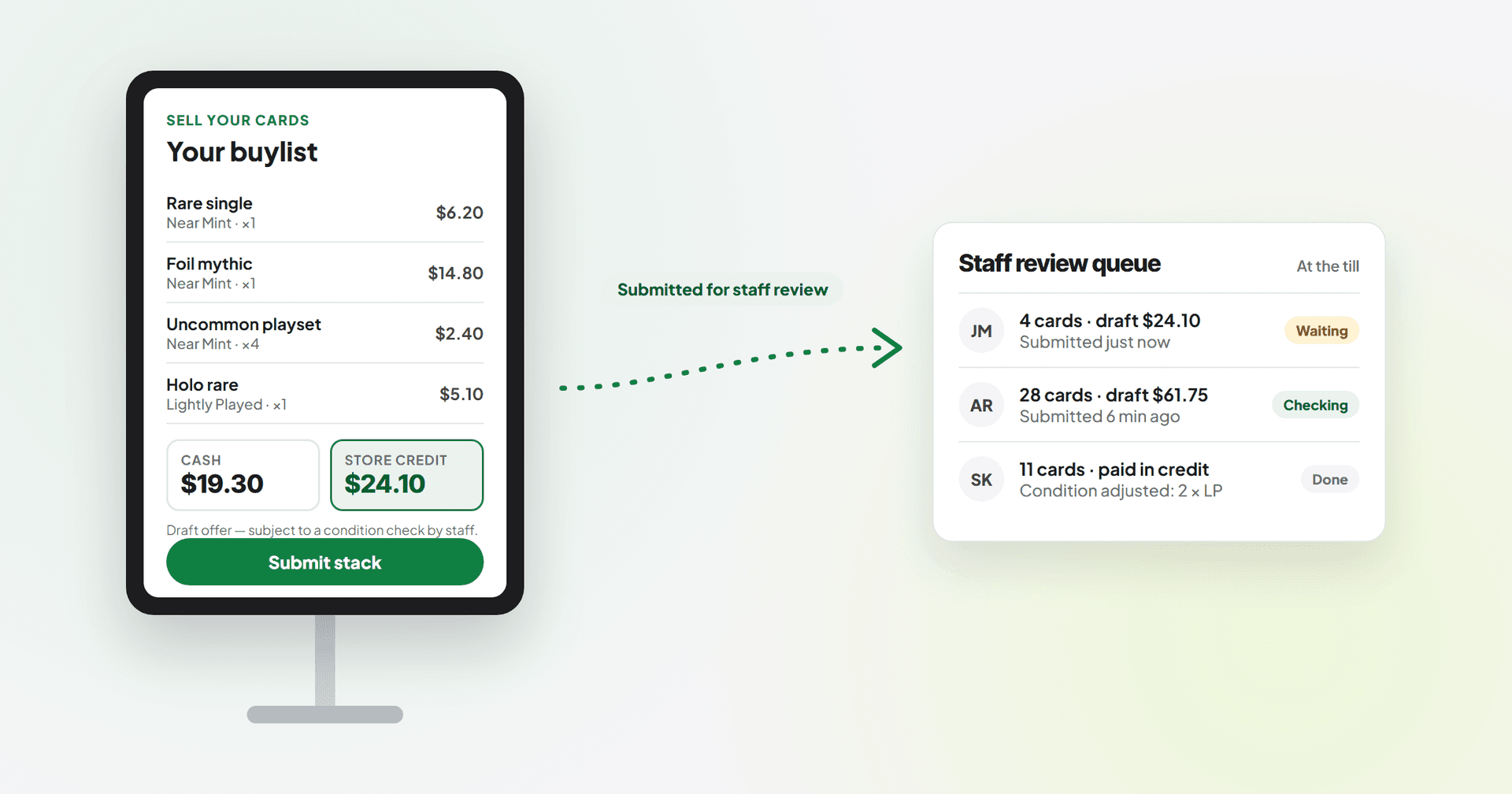
It's half past two on a Saturday. The till has three people waiting with sleeves and a booster box, and someone has just put a binder on the counter. "What would you give me for these?"
You know how this goes. Somebody has to stop, open the binder, look up forty-odd cards one by one, write numbers on a pad, add it up, explain cash versus credit, and then wait while the customer decides whether to keep the foil they've suddenly got sentimental about. Meanwhile the queue behind gets longer and the person who only wanted a deck box leaves.
Trade-ins are good business. They bring singles into your stock and keep value circulating inside your shop. The problem isn't the buylist — it's where the work happens. Most of that lookup time takes place at the busiest point in the building, done by the one person who should be serving.
This post is about moving the first half of that job off the counter and onto a self-service kiosk, without giving away control of the part that matters: deciding what you actually pay.
What "kiosk buylist submission" actually means
The idea is simple. Instead of the customer handing a stack to staff and waiting, they go to a customer-facing screen — a tablet or desktop on a stand — and build the list themselves.
In practice the flow looks like this:
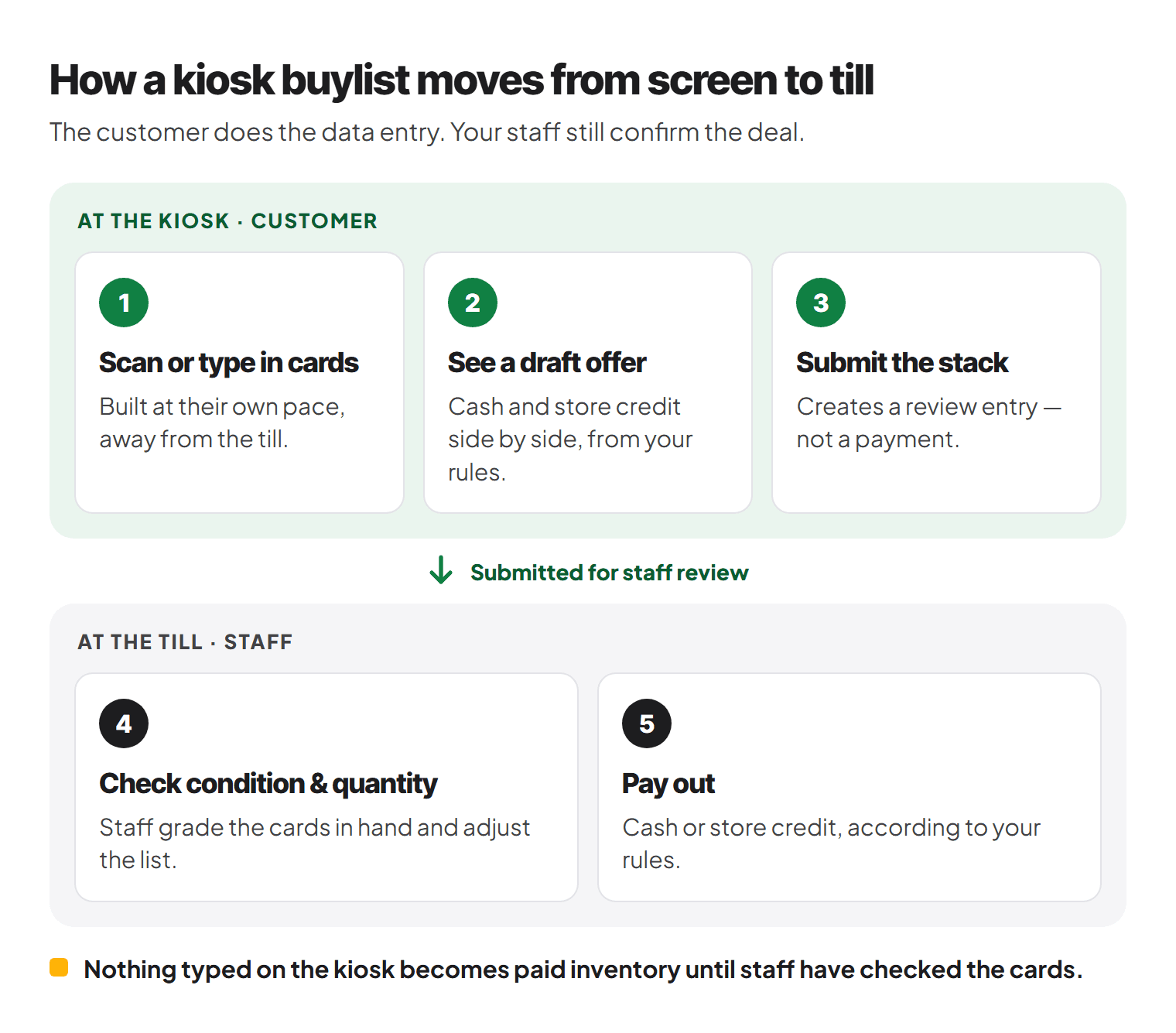
- The customer scans or types in the cards they want to sell.
- They see a draft offer in both cash and store credit, based on the buy prices and rules you've set.
- They submit the stack. That creates an entry in a staff review queue — not a payment.
- Staff check condition and quantity at the till when they're ready.
- Payout happens as cash or store credit, according to your rules.
The key word in step 2 is draft. The customer is doing the data entry and getting a realistic expectation. Your team is still the one that confirms the deal. Nothing a customer types on the kiosk turns into paid inventory until someone behind the counter has looked at the cards.
Why it saves time — and what it doesn't replace
What it takes off the counter
- The lookup. Searching every card, picking the right printing, and finding the price is usually the slowest bit. On a kiosk, the customer does that at their own pace, not yours.
- The "cash or credit?" conversation. When the customer sees both offers side by side before they reach you, they've usually decided already. That's one less negotiation at the till.
- The "actually, I'll keep that one" shuffle. People change their minds. Better they do it at the kiosk, removing cards from a list, than at the counter while you're re-adding a column of numbers.
- The pen-and-paper tally. A submitted list arrives already structured, so staff are checking rather than building from scratch.
The net effect is that a trade-in which might take ten minutes of counter time becomes a few minutes of checking. Your staff aren't working less hard — they're spending their time on the bit that needs a human.
What it doesn't replace
Be honest with yourself (and your customers) about this:
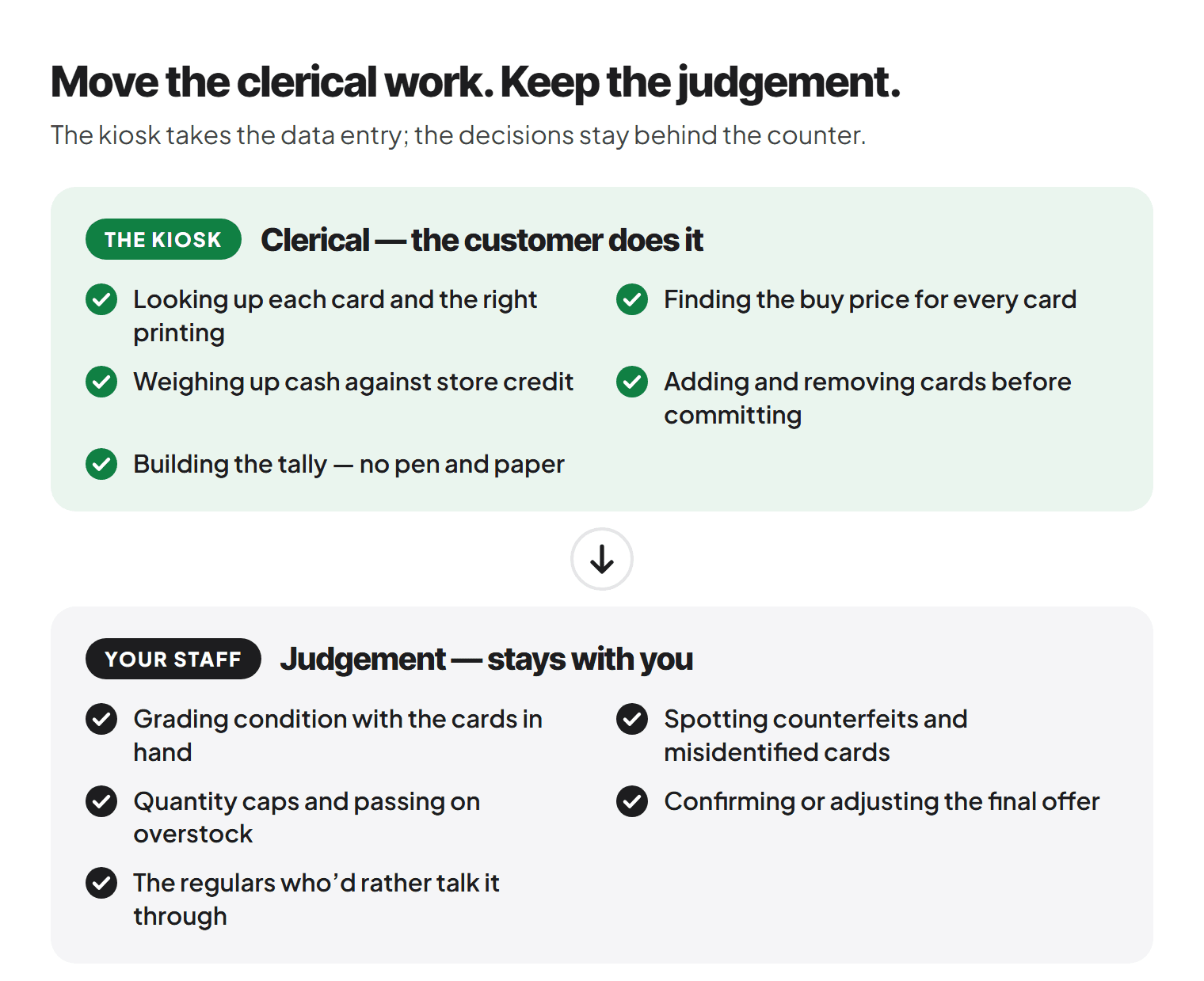
- Condition grading is still your call. A customer will often see their cards as Near Mint. Whether that's true is a judgement your staff make with the cards in hand. The kiosk offer should be presented as "subject to condition check", because it is.
- Counterfeit and misidentified cards. A kiosk can't feel card stock or spot a wrong set symbol. Staff still need to handle the actual cards.
- Payout decisions. You might want to cap how many copies of a card you'll take, pass on something you're already overstocked on, or counter-offer. That stays with you.
- Relationships. Some regulars like to chat through their trade. The kiosk is an option, not a wall between you and them.
Think of it as moving the clerical part of the buylist to the customer, while the judgement part stays with staff.
Practical setup tips
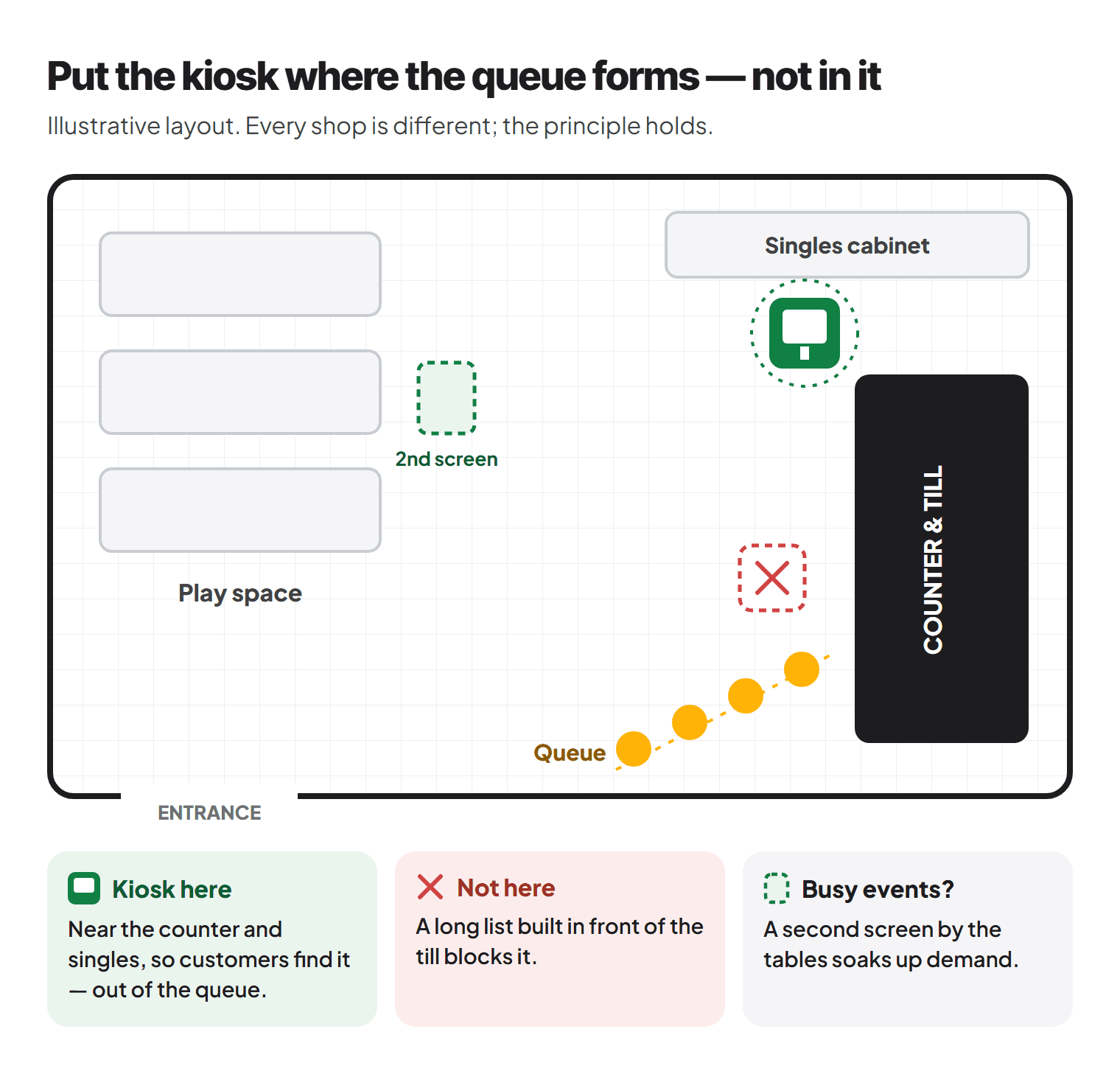
Put it where the queue forms — but not in it
The kiosk should be close enough to the counter that customers find it naturally, but far enough away that someone building a long list isn't blocking the till. A corner near the singles cabinet often works well. If you run a busy play space, a second screen near the tables can soak up demand during events.
Signage that sets expectations
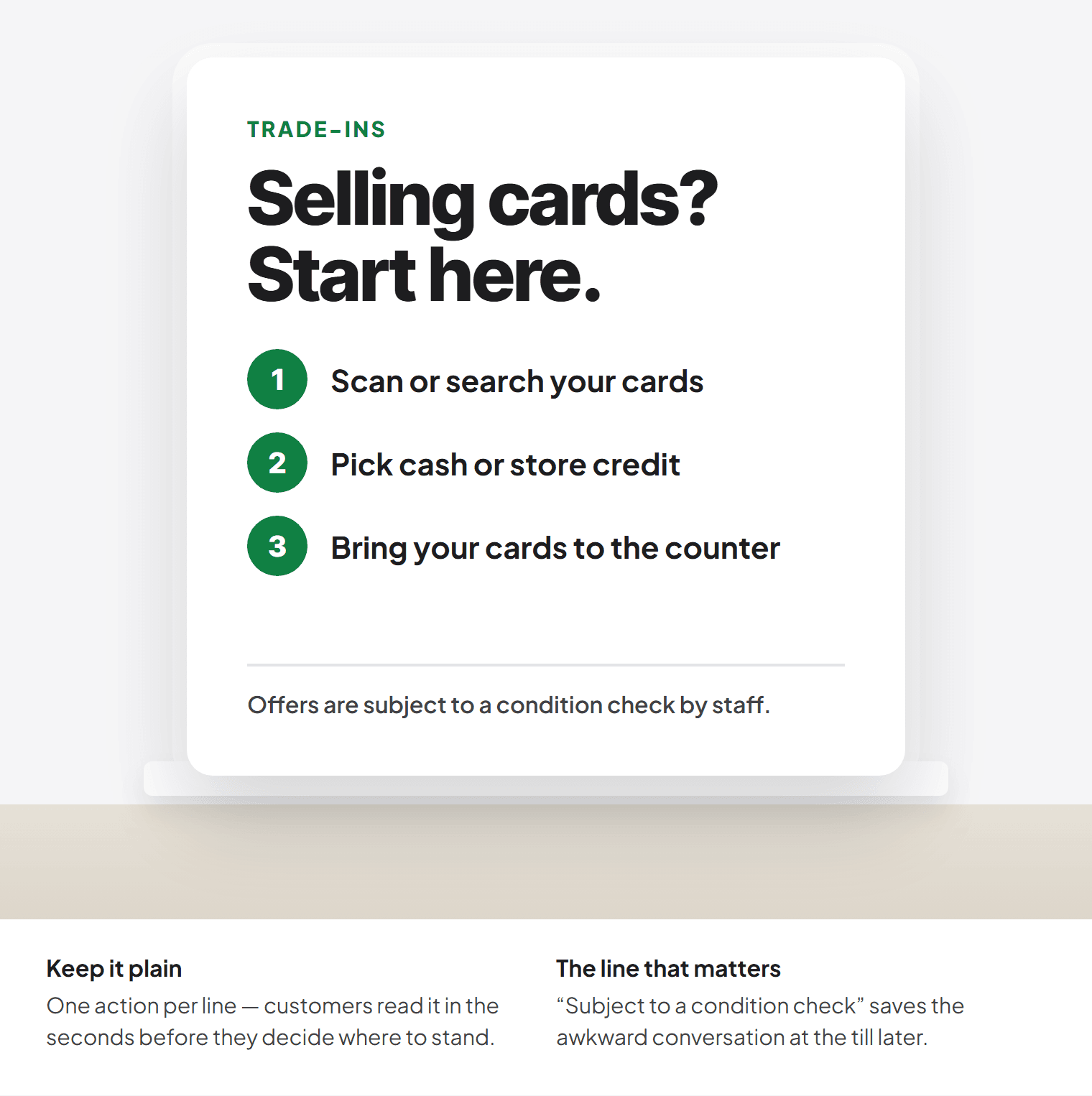
A small sign does a lot of work. Keep it plain:
Selling cards? Start here.
Scan or search your cards, pick cash or store credit, then bring your cards to the counter.
Offers are subject to a condition check by staff.
That last line saves awkward conversations later. It's also worth saying at the counter: "The kiosk gave you an estimate — we'll just check condition and confirm."
Decide your house rules before go-live
Write these down so every staff member answers the same way:
- Minimum value or card count for a buylist (or none at all).
- Which games and conditions you buy. If you don't take heavily played bulk, make sure the kiosk isn't showing offers for it.
- Quantity caps on cards you already hold plenty of.
- When you review submissions. Immediately? Within the hour? Next morning on busy days? Tell customers.
- ID or account requirements for cash payouts, in line with your own policy.
Use cash vs credit deliberately
Most shops already offer a better rate for store credit than for cash, because credit keeps value in the shop. The kiosk makes this visible in a useful way: when the customer sees both numbers next to each other on screen, the trade-off speaks for itself, without anyone at the counter having to pitch it.
A couple of things help:
- Keep the gap consistent so customers learn what to expect.
- Make credit easy to spend. Credit that sits on the customer's account and can be used at the till, online or for event entry feels like real money. Credit that lives in a notebook doesn't.
- Track what you owe. Outstanding store credit is a liability. Make sure you can see the total, not just individual balances.
Plan for peak hours — FNM and prerelease
Busy evenings are where the kiosk earns its spot, but they're also where a backlog can build up if you're not careful.
- Friday Night Magic: the till is busy with entries, sleeves, drinks and sealed. Let the kiosk take buylist intake starts, and agree in advance whether staff review them during the event or after the last round. Tell customers which it'll be.
- Prerelease weekends: expect people to sell cards to fund their entry or pick up a box. If you're offering credit that can go straight towards an event or sealed product, say so on the sign.
- Give the queue an owner. On a busy night, decide which staff member checks kiosk submissions. If it's "whoever's free", it's nobody.
- Have a fallback. If the connection drops or the screen dies, your normal counter workflow is the backup. Make sure newer staff know it.
Train staff on the review step
The review is now the main counter task, so make it quick and consistent:
- Pull up the submission, take the cards, and check them against the list.
- Grade condition, adjust quantities, flag anything that isn't what it says.
- Explain any change to the offer briefly and calmly: "Two of these are Lightly Played, so that's come down a bit."
- Confirm cash or credit and pay out.
A short checklist taped near the till helps new starters more than any amount of explaining.
Mistakes to avoid
Treating the kiosk offer as final. If your setup or your wording makes customers believe the on-screen number is guaranteed, every condition adjustment becomes an argument. Always frame it as a draft.
Letting submissions pile up unreviewed. A queue of thirty untouched submissions on a Monday morning means irritated customers who were promised a quick decision. Set a review routine and stick to it.
Buy prices that drift out of date. If kiosk offers lag behind the market, you'll either overpay or put customers off. Make sure your buy prices are kept current and that margin rules are set the way you want.
Showing offers for things you don't want. If you won't buy damaged cards or a particular game, don't let the kiosk invite submissions for them.
Forgetting the regulars. Some customers will always prefer to hand you the binder. That's fine. The kiosk is there to absorb volume, not to force everyone through a screen.
Buying hardware before planning the setup. Scanners, printers and stands vary. Work out what you actually need for your counter layout before ordering anything.
No plan for when it's offline. Any connected system will have a bad day. Staff should know how to fall back to the counter without a fuss.
Bringing it together
A self-service kiosk won't grade a card or decide your margins, and it shouldn't. What it can do is take the slowest, most repetitive part of a trade-in — the lookup and the list-building — away from the till at exactly the moments you can least afford it. Customers get a clear estimate and a choice between cash and credit; your staff get a tidy list to check rather than a binder to work through from scratch.
If you'd like to see how this works in TCG Sync, the kiosk page covers the customer-facing modes, including buylist intake, and how submissions queue for staff verification before any payout. The buylist page explains how buy prices, condition pricing and the staff approval workflow fit together, and store credit covers how accepted trade-ins become a balance customers can spend in your shop.
Tell us how your counter runs on a busy Saturday, and we'll help you work out whether a kiosk makes sense for your shop.
Ready to try Storefront Pro? Contact us — Storefront Pro is open for new stores now.